

Description
Record Your Coding Projects with Ease
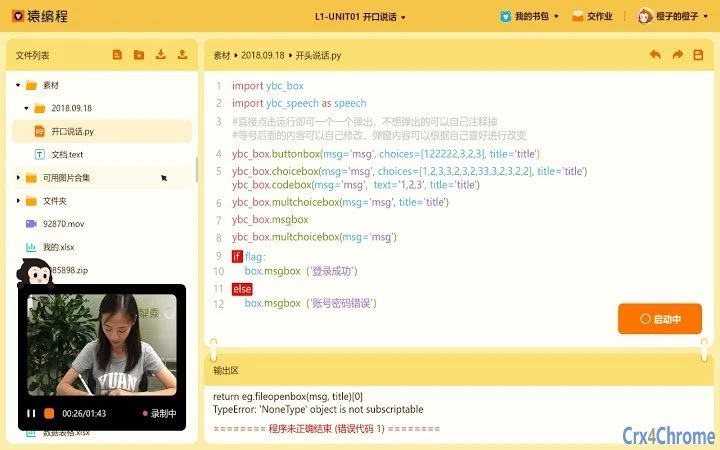
Designed specifically for students using the python.yuanfudao.com platform, this desktop application streamlines the process of capturing and preserving programming work. It serves as a dedicated screen recording tool tailored to educational needs, enabling learners to record their Python coding sessions directly from their development environment. The software supports seamless integration with the official learning website, allowing students to submit recorded projects without switching between tools.
Targeted at young learners and beginners in programming, the tool simplifies the workflow for documenting progress, preparing for assessments, or sharing projects with instructors. It eliminates the need for third-party recording software, reducing setup time and potential compatibility issues. By focusing on a single purpose—recording coding sessions—it minimizes distractions and ensures consistent output quality.
The developer did not provide additional details about the organization or background. However, the tool’s purpose is clearly aligned with the educational mission of the parent platform. Real-world usage includes recording live coding exercises, demonstrating problem-solving steps, or creating tutorial-style walkthroughs for classroom submission.
Key Features & Capabilities
- Targeted Screen Recording – Optimized for capturing Python coding sessions within the learning environment, ensuring clarity and focus on the code editor and terminal.
- One-Click Recording – Enables students to start and stop recordings with minimal effort, reducing the learning curve for beginners.
- Direct Submission Integration – Designed to work in tandem with python.yuanfudao.com, allowing recorded files to be uploaded directly from the application.
- Lightweight Design – With a file size of 15.6 MB, the software is compact and efficient, suitable for devices with limited storage.
- Platform-Specific Versions – Available for both Windows and Mac, ensuring accessibility across major desktop operating systems.
Each feature is built around the educational workflow. For instance, one-click recording helps students focus on learning rather than technical setup. The direct submission capability eliminates manual file transfers, reducing the risk of lost or misplaced recordings. The lightweight nature makes it ideal for school-issued devices or home computers with modest specifications.
User Interface, Workflow & Performance
The user interface appears to be minimal and task-focused, prioritizing ease of access over advanced customization. Navigation is likely streamlined to support rapid initiation of recordings, with core functions positioned for immediate use. The design emphasizes clarity, helping users avoid confusion during critical moments like exam preparation or assignment submission.
Workflow efficiency is enhanced by the tool’s integration with the learning platform. Users can begin recording directly from the application without launching additional software. This reduces context switching and supports uninterrupted learning sessions. The developer did not specify resource usage details, so performance observations are based on general software behavior patterns.
Stability and responsiveness are expected to be consistent, given the tool’s limited scope and small file size. However, exact CPU or RAM behavior was not provided. The software is designed for occasional use, such as recording a few sessions per week, which aligns with typical student workflows.
Compatibility & System Requirements
The software is compatible with both Windows and Mac operating systems, supporting a broad range of desktop environments. The release version is 1.0, indicating a stable initial launch. The installation size is 15.6 MB, which is compact and suitable for devices with limited storage capacity.
Exact system requirements were not listed. Compatibility information is limited to the operating systems mentioned. No specific hardware requirements were provided. Users are advised to ensure their system meets general desktop standards for running a modern application.
Pros and Cons
Pros
- Specifically designed for Python learners on the yuanfudao platform
- Simple, intuitive interface ideal for beginners
- Direct integration with the learning website for easy submission
- Small file size reduces installation burden
- Available for both Windows and Mac users
Cons
- No information on advanced recording settings or editing tools
- Limited to use with a specific educational platform
- Exact system requirements not disclosed
- No support for recording external applications beyond the intended environment
- Version 1.0 suggests limited feature set for future updates
FAQ Section
Is this software free to use?
Yes, the software is available at no cost. It is provided as a complimentary tool for students using the python.yuanfudao.com platform.
Can I use this tool outside of the official learning website?
The software is designed for use with python.yuanfudao.com. While it may function on other systems, its core features are optimized for integration with the platform and may not offer full functionality outside this context.
Does the software require an internet connection?
Recording can be performed offline, but uploading recorded projects to the learning website requires an active internet connection.
How often is the software updated?
Updates are managed by the developer, but specific update frequency was not disclosed. Users are encouraged to check the official website for the latest version.
Is the software secure?
The software is intended for educational use and was distributed through the official platform. Users should download it only from trusted sources to ensure safety.
Final Thoughts + CTA
This screen recording tool offers a focused, student-friendly solution for capturing Python coding sessions. Its tight integration with the yuanfudao learning platform makes it a valuable asset for young programmers who need to document their progress efficiently. While it lacks advanced features, its simplicity and purpose-driven design are strengths for its target audience.
For students enrolled in Python courses on python.yuanfudao.com, this tool eliminates friction in the recording and submission process. It’s particularly beneficial for those who are new to programming and may struggle with more complex software.
Download the latest version today.
Guides & Tutorials for 猿编程录屏 Extension for Chrome
How to install 猿编程录屏 Extension for Chrome
- Click the Preview / Download button above.
- Once redirected, accept the terms and click Install.
- Wait for the 猿编程录屏 Extension for Chrome download to finish on your device.
How to use 猿编程录屏 Extension for Chrome
This software is primarily used for its core features described above. Open the app after installation to explore its capabilities.
User Reviews for 猿编程录屏 Extension for Chrome 0
No reviews found





